User Management
Overview
User Management handles the administration of back office users, partners,
roles, and permissions. It includes a permission tree for granular access
control, audit logs for tracking user activity, and partner management
for external integrations. Note: RBAC is currently disabled — all users have
isAdmin: true.
Navigate to: Sidebar → User Management
All Users
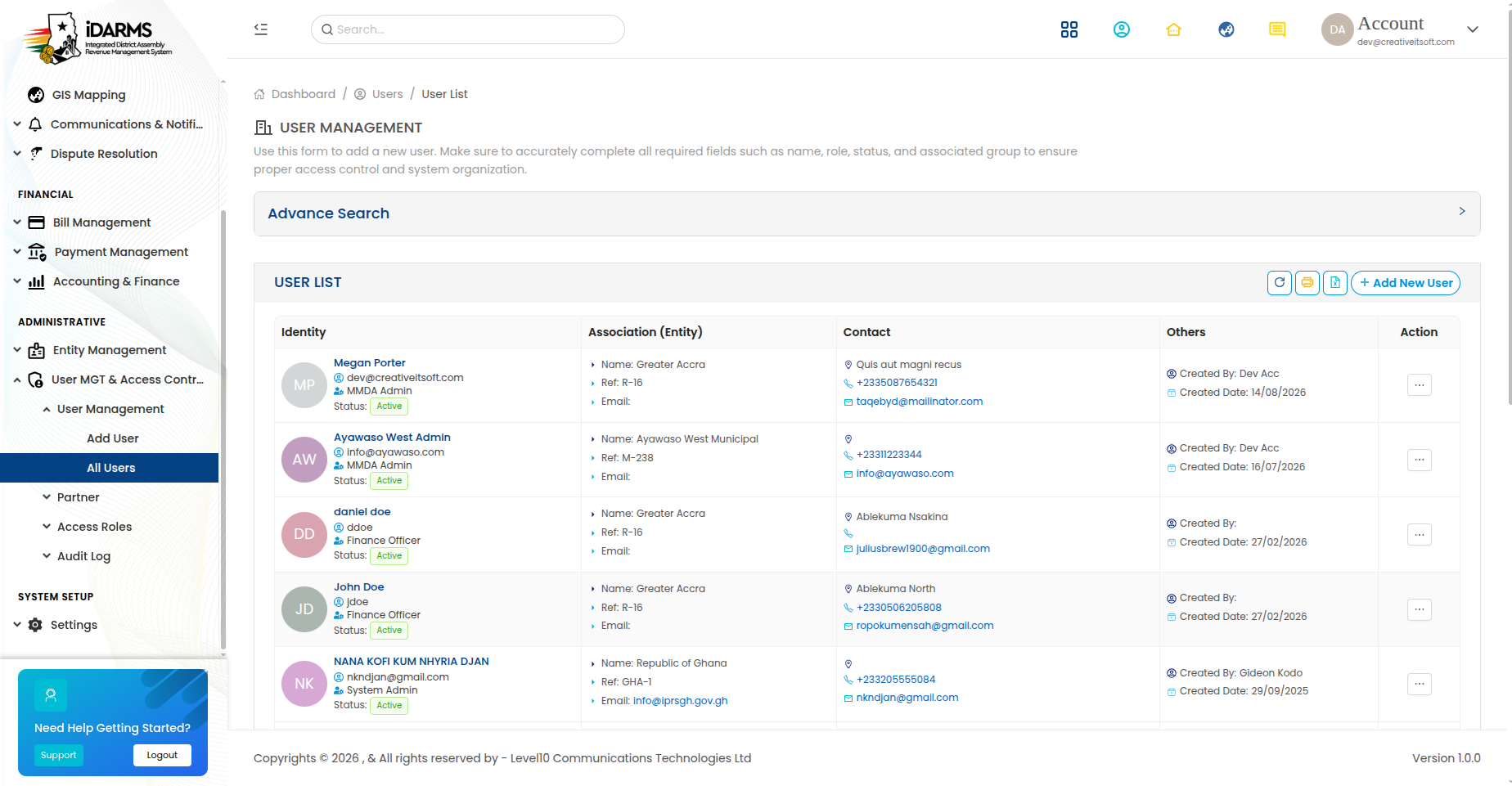
Navigate to: /usermanagement/allusers
| Element | Description |
|---|---|
| Search bar | Search users by name, email, or role |
| Filter options | Filter by role, status, or MMDA |
| Add User button | Create a new back office user |
| User card | Shows user details and status |
User Card
| Field | Description |
|---|---|
| Avatar | Auto-generated initials with colour |
| Name | Full name of the user |
| Email address | |
| Role | Assigned role (e.g. Admin, Manager, Operator) |
| MMDA | Assigned MMDA (if applicable) |
| Status badge | Active, Inactive, or Locked |
| Last Login | When the user last logged in |
User Status
| Status | Description |
|---|---|
| Active | User can log in and access the system |
| Inactive | User account is disabled |
| Locked | Account locked due to too many failed login attempts |
Things to check
- User list loads with correct data
- Search works across name, email, and role fields
- Status indicators are clearly visible
- Inactive users cannot log in
- Locked users can be unlocked by an admin
Add / Edit User
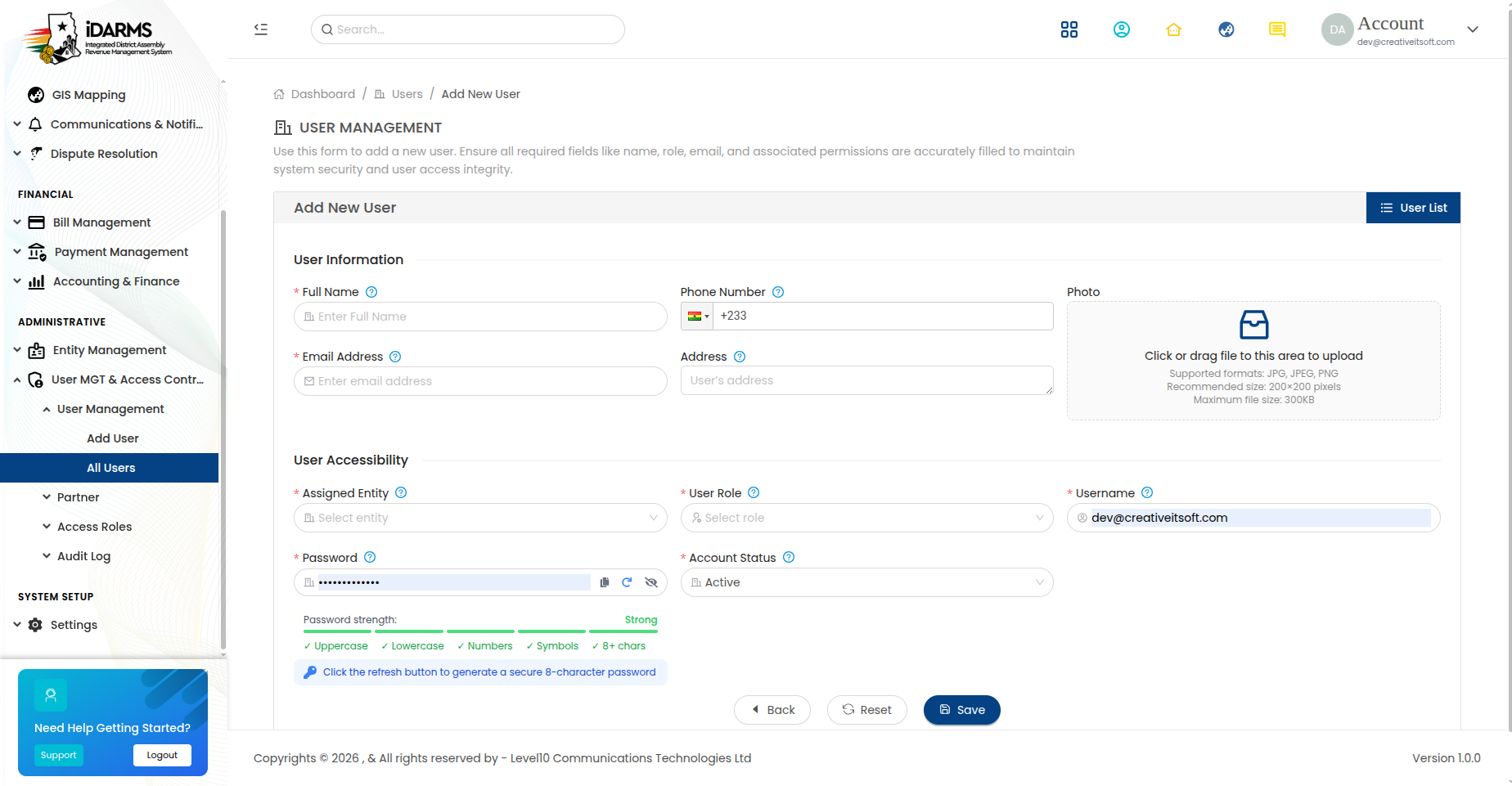
Navigate to: /usermanagement/adduser or /usermanagement/edit/:id
User Form
| Field | Required | Description |
|---|---|---|
| First Name | Yes | User's first name |
| Last Name | Yes | User's last name |
| Yes | Email address (used for login and OTP) | |
| Phone | Yes | Contact phone number |
| Role | Yes | Assigned role from the dropdown |
| MMDA | Conditional | Required if role is MMDA-specific |
| Password | Yes | Initial password (edit mode: leave blank to keep current) |
| Confirm Password | Yes | Must match password |
| Status | Yes | Active or Inactive |
Role Selection
| Role Type | Description |
|---|---|
| Super Admin | Full system access |
| MMDA Admin | Admin access within a specific MMDA |
| Manager | Operational management access |
| Operator | Day-to-day transaction access |
| Viewer | Read-only access |
Things to check
- Email is validated and unique
- Password complexity requirements are enforced
- MMDA field is required only for MMDA-specific roles
- Role dropdown shows all available roles
- Edit mode pre-fills all fields correctly
- Changing a user's role takes effect immediately
All Partners
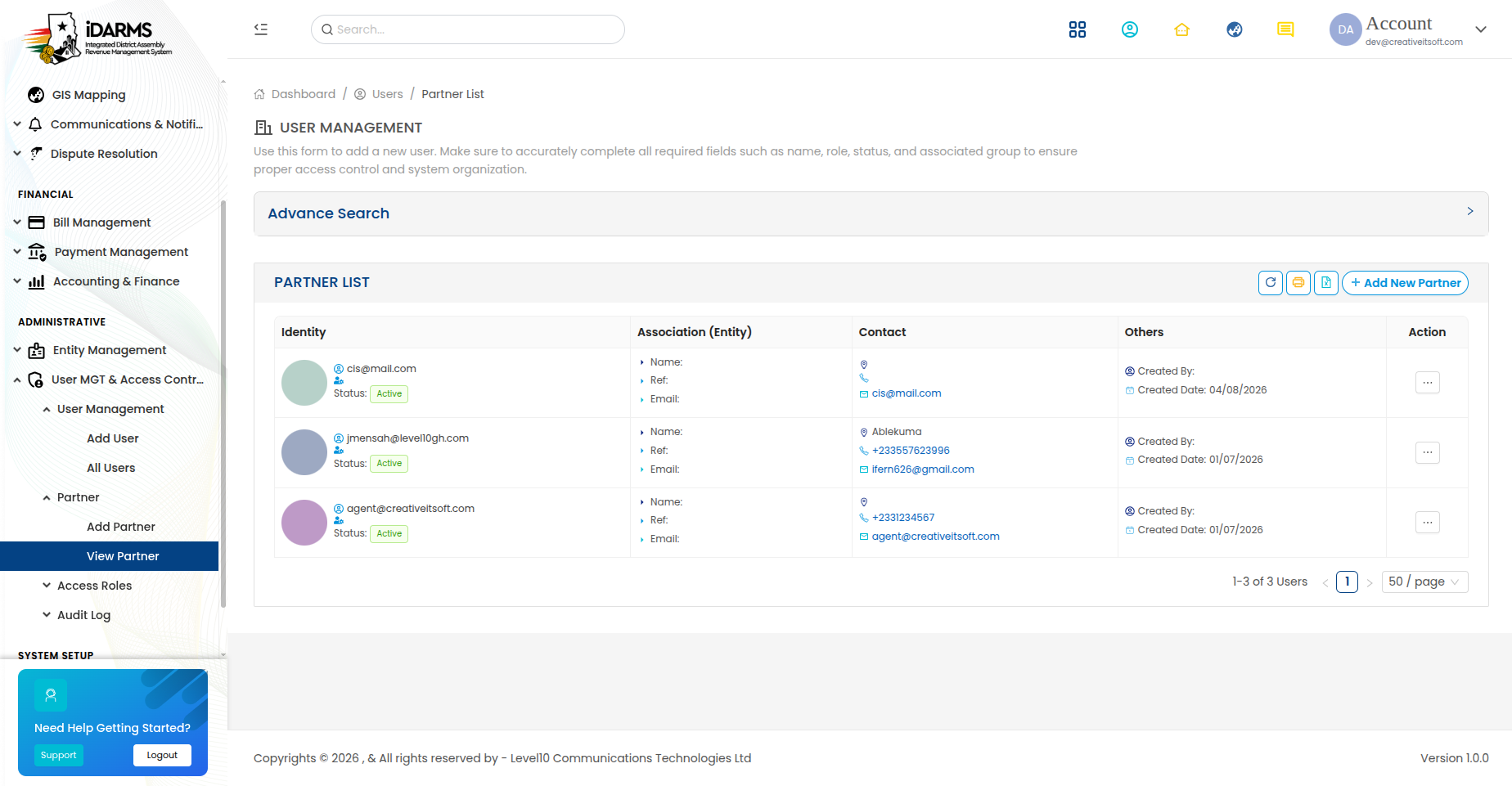
Navigate to: /usermanagement/listpartner
Manage external partners integrated with the iDARMS system (e.g. payment gateways, SMS providers, utility companies).
| Element | Description |
|---|---|
| Search bar | Search partners by name or type |
| Add Partner button | Register a new partner |
| Partner card | Shows partner details and status |
Partner Card
| Field | Description |
|---|---|
| Partner Name | Name of the partner organisation |
| Partner Type | Payment Gateway, SMS Provider, Utility, etc. |
| Contact Person | Primary contact name |
| Contact email | |
| Status | Active or Inactive |
| Integration Status | Connected, Pending, or Disconnected |
Add / Edit Partner
Navigate to: /usermanagement/addpartner or /usermanagement/editpartner/:id
| Field | Required | Description |
|---|---|---|
| Partner Name | Yes | Name of the partner organisation |
| Partner Type | Yes | Type of integration |
| Contact Person | Yes | Primary contact name |
| Yes | Contact email | |
| Phone | Yes | Contact phone number |
| API Key | Conditional | Required for API integrations |
| Webhook URL | No | Callback URL for notifications |
| Status | Yes | Active or Inactive |
Things to check
- Partner details are saved correctly
- API key is stored securely (not displayed in plain text after save)
- Integration status reflects the actual connection state
- Inactive partners cannot be used for transactions
All Roles
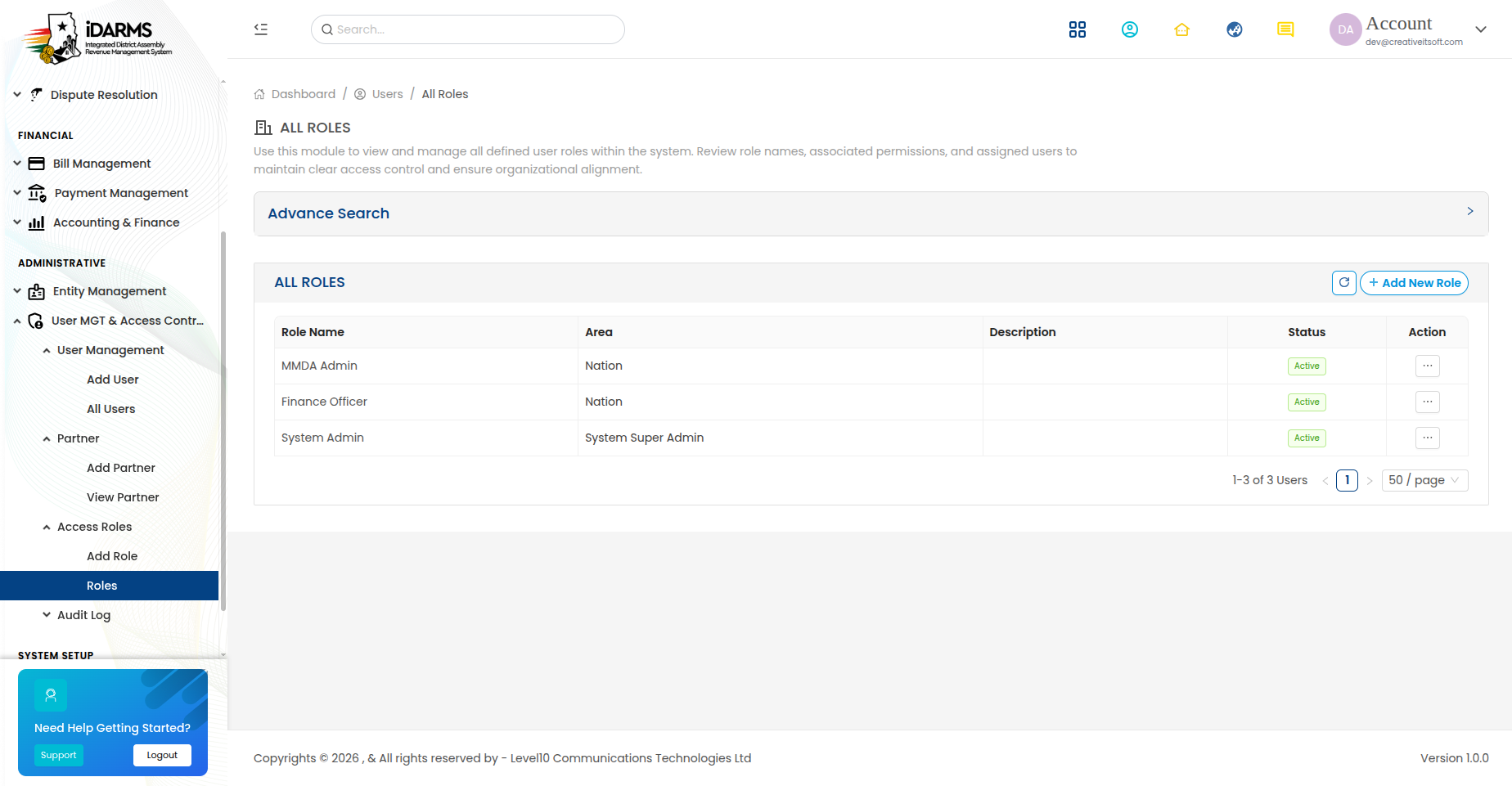
Navigate to: /usermanagement/roles
| Element | Description |
|---|---|
| Search bar | Search roles by name |
| Add Role button | Create a new role |
| Role card | Shows role name, description, and user count |
Role Card
| Field | Description |
|---|---|
| Role Name | Name of the role |
| Description | What this role is for |
| User Count | Number of users assigned to this role |
| Status | Active or Inactive |
Add / Edit Role
Navigate to: /usermanagement/addrole or /usermanagement/edit-role/:id
| Field | Required | Description |
|---|---|---|
| Role Name | Yes | Unique name for the role |
| Description | Yes | Description of the role's purpose |
| Permission Tree | Yes | Granular permissions (see below) |
| Status | Yes | Active or Inactive |
Permission Tree
The permission tree provides granular control over what each role can access and perform.
Module Permissions
| Module | Permissions |
|---|---|
| Dashboard | View Dashboard |
| Property Management | View, Add, Edit, Delete, Import, Export, Inspect, Verify |
| Entity Management | View, Add, Edit, Delete, Import, Export |
| Rate Payer Management | View, Add, Edit, Delete, Import, Verify |
| Bill Management | View, Generate, Issue, Cancel, Adjust |
| Payment Management | View, Record Offline, Refund |
| Accounting & Finance | View, Add Journal, Post, Reverse, Export Reports |
| Communication | View, Send Email, Send SMS, Send Bulk, Manage Templates |
| Dispute Resolution | View, File, Assign, Resolve, Reject |
| GIS Mapping | View Map |
| User Management | View, Add, Edit, Delete Users, Manage Roles |
| Settings | View, Edit All Settings |
Permission Levels
| Level | Description |
|---|---|
| None | No access to the module |
| View | Read-only access |
| Add | Can create new records |
| Edit | Can modify existing records |
| Delete | Can remove records |
| Full | Complete access (Add + Edit + Delete + special actions) |
Permission Tree Display
| Element | Description |
|---|---|
| Module checkboxes | Toggle access to entire modules |
| Action checkboxes | Toggle specific actions within modules |
| Expand/collapse | Toggle child permissions |
| Select all | Select all permissions for a module |
Things to check
- Permission tree loads correctly with all modules
- Checking a parent permission selects all child permissions
- Unchecking a child permission unchecks the parent if not all children are selected
- Permission changes are saved correctly
- Users with the role see only the modules/actions they have permission for
- Permission tree is consistent with the actual access control (even though RBAC is currently disabled)
Login History

Navigate to: /usermanagement/loginhistory
Audit log of all login attempts across the system.
| Element | Description |
|---|---|
| Search bar | Search by user, IP address, or date |
| Filter options | Filter by status (Success, Failed), date range, or user |
| Login card | Shows login attempt details |
Login Card
| Field | Description |
|---|---|
| User | Who attempted to login |
| User's email address | |
| IP Address | Source IP address of the login attempt |
| Status badge | Success, Failed, or Locked |
| Device/Browser | Device and browser information |
| Date & Time | When the login attempt occurred |
| Failure Reason | Reason for failed attempts (wrong password, account locked, etc.) |
Things to check
- All login attempts (success and failure) are logged
- IP addresses are captured correctly
- Device/browser information is captured
- Failed attempts show the correct failure reason
- Date/time is in the correct timezone
- Search and filter work correctly
Change History

Navigate to: /usermanagement/changelog
Audit log of all data changes made in the system.
| Element | Description |
|---|---|
| Search bar | Search by user, module, or date |
| Filter options | Filter by module, action type, or date range |
| Change card | Shows change details |
Change Card
| Field | Description |
|---|---|
| User | Who made the change |
| Module | Which module was affected (Property, Bill, Payment, etc.) |
| Action | Create, Update, Delete |
| Record ID | ID of the affected record |
| Old Value | Previous value (for updates) |
| New Value | New value (for updates) |
| Date & Time | When the change was made |
Things to check
- All data changes are logged
- Old and new values are captured for updates
- Module and action types are correctly categorized
- Search and filter work correctly
- Changes are logged with accurate timestamps
Activity Log
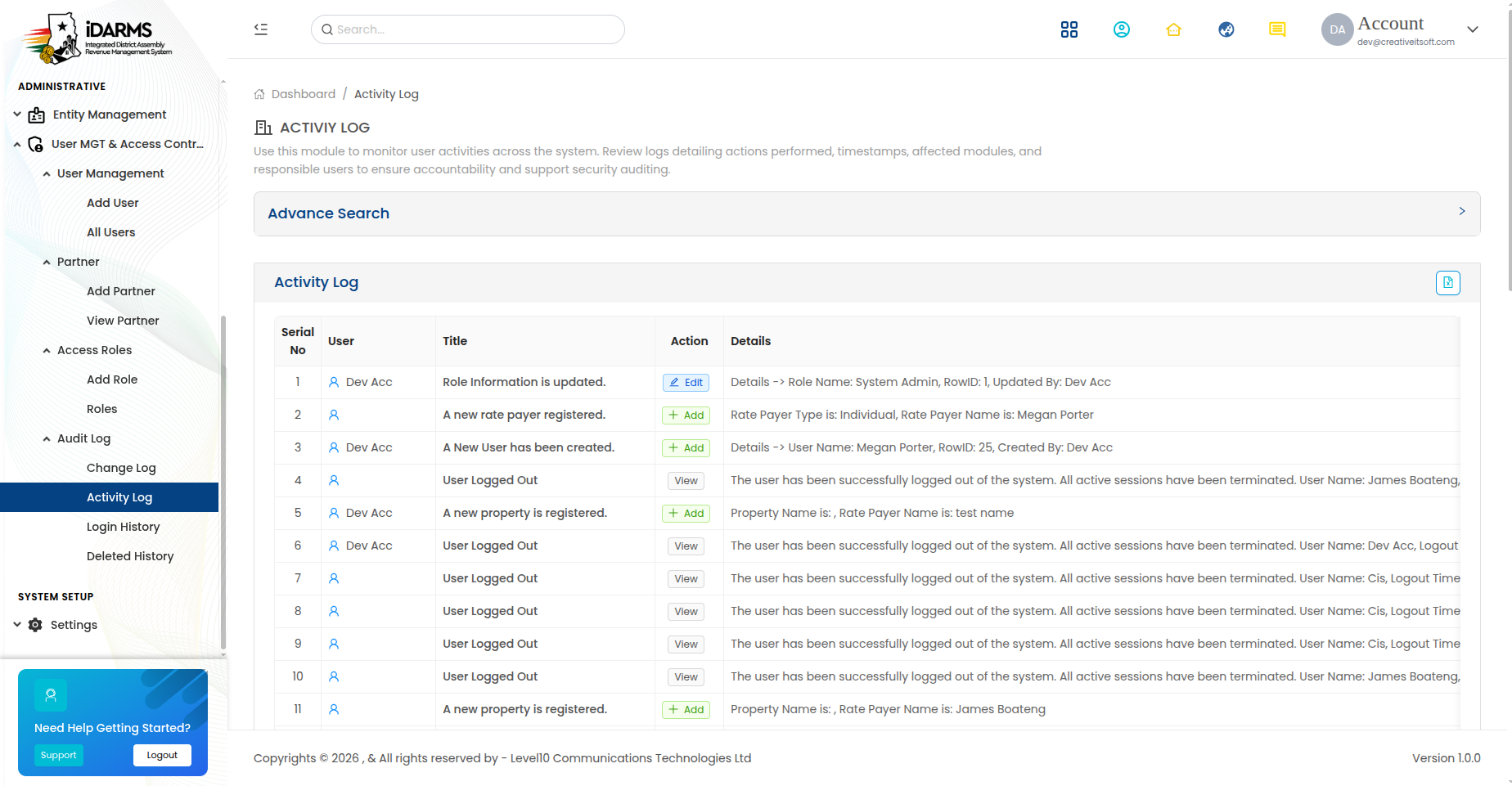
Navigate to: /usermanagement/activitylog
General activity log tracking all user actions in the system.
| Element | Description |
|---|---|
| Search bar | Search by user, action, or date |
| Filter options | Filter by action type, module, or date range |
| Activity card | Shows activity details |
Activity Card
| Field | Description |
|---|---|
| User | Who performed the action |
| Action | What was done |
| Module | Which module was affected |
| Details | Additional details about the action |
| IP Address | Source IP address |
| Date & Time | When the action occurred |
Delete History
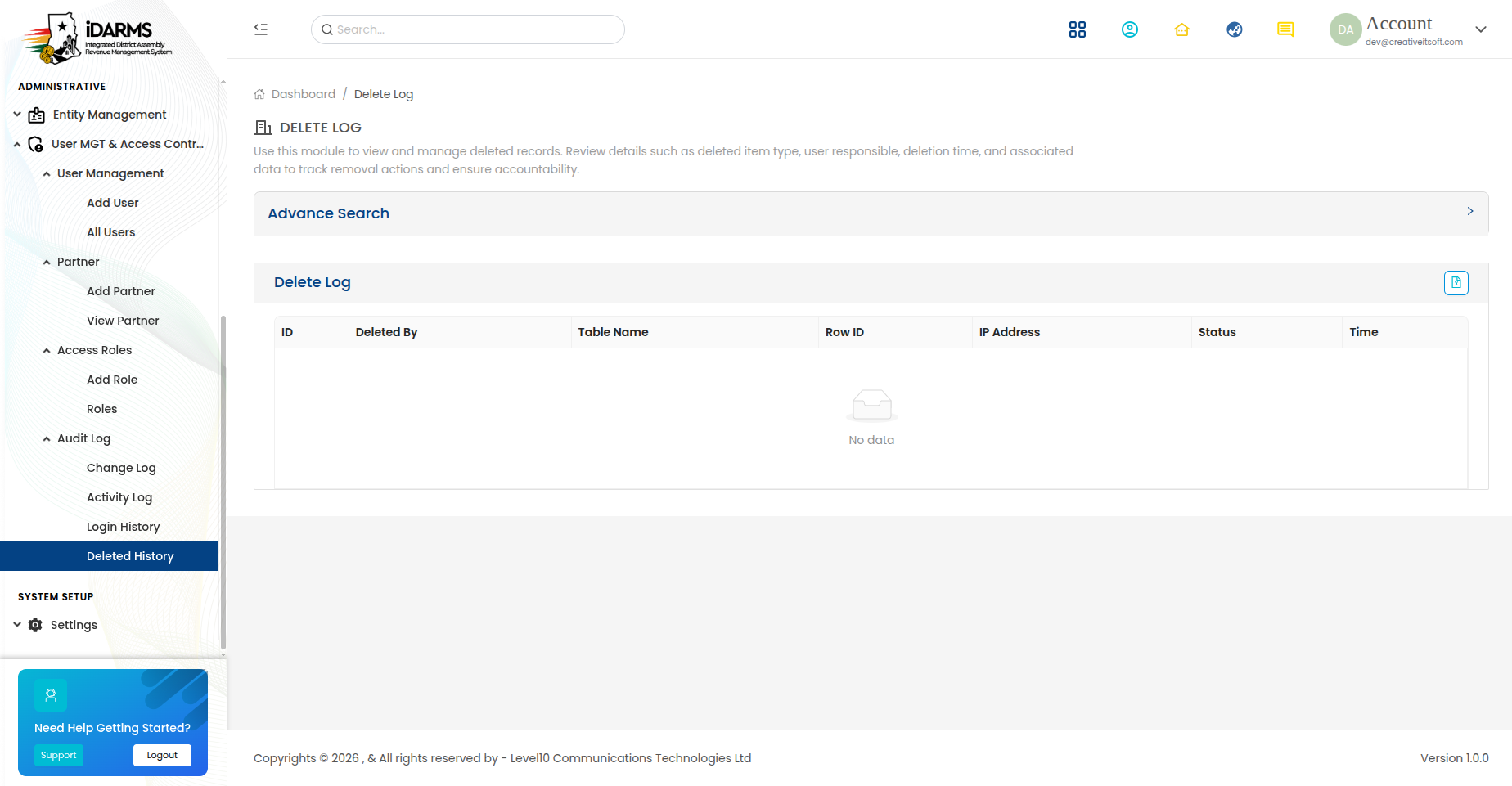
Navigate to: /usermanagement/deletedhistory
Audit log of all deleted records — soft deletes are preserved here.
| Element | Description |
|---|---|
| Search bar | Search by user, module, or date |
| Filter options | Filter by module or date range |
| Delete card | Shows deletion details |
Delete Card
| Field | Description |
|---|---|
| User | Who deleted the record |
| Module | Which module the record belonged to |
| Record ID | ID of the deleted record |
| Record Type | Type of record (Property, Rate Payer, Bill, etc.) |
| Record Name | Name/identifier of the deleted record |
| Deleted At | When the record was deleted |
| Restore | Option to restore the deleted record |
Things to check
- Deleted records are preserved in the delete history
- Restore functionality works correctly
- Delete history captures all relevant record details
- Only authorised users can restore deleted records
- Restored records return to their previous state
User Management Workflow
Admin Creates User (Add User form)
        ↓
Role Assigned → Permissions Granted (via Permission Tree)
        ↓
User Activated (Status: Active)
        ↓
User Logs In → Login Logged
        ↓
User Performs Actions → Activity Logged
        ↓
User Makes Data Changes → Change History Logged
        ↓
User Deletes Records → Delete History Logged
RBAC Status
Role-Based Access Control is currently disabled. All users have
isAdmin: true regardless of their assigned role. The permission
tree is stored but not enforced. This must be enabled before
production deployment.
Things to check
- User creation requires all mandatory fields
- Role assignment is reflected in the permission tree
- Login history captures all attempts (success and failure)
- Change history captures all data modifications
- Delete history preserves all deleted records
- Activity log captures all user actions
- Audit logs are tamper-proof (read-only)
- User status changes (Active ↔ Inactive) take effect immediately